
YouTube Video Downloader

Paste a public YouTube link. Savio returns one direct MP4 with audio — usually 360p, sometimes 720p, no sign-in.

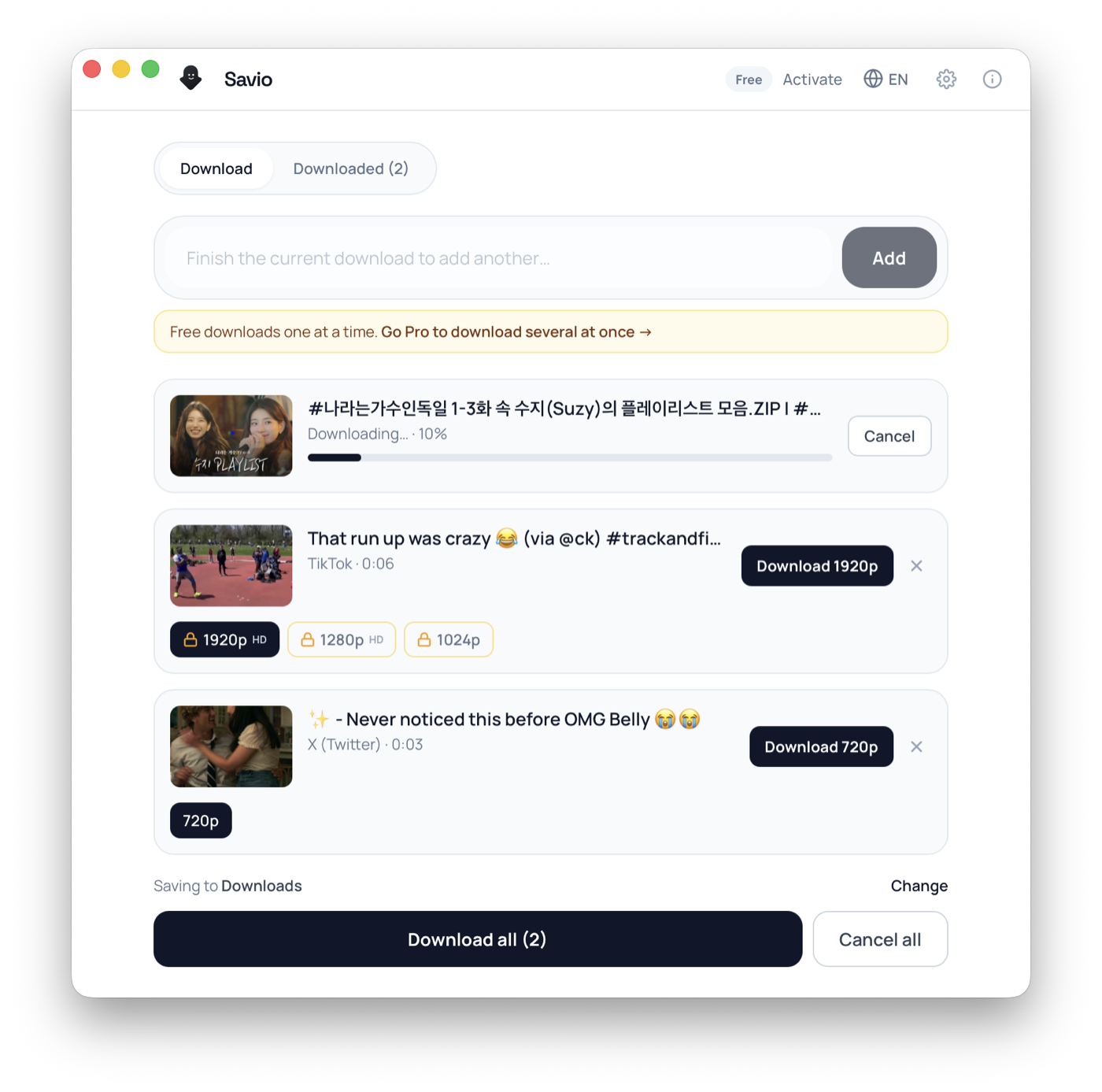
Savio Desktop — batch download queue showing per-video resolution options and live progress

Free desktop app

Download what the browser can't

Free to download. It runs yt-dlp right on your computer — so it works with more sites than the web tool, with no servers in between.

Pro unlocks 4K and larger batches — 3-day trial, cancel anytime.

1

Paste link

2

Get link

3

Download

YouTube Video Downloader

Savio is a web-based YouTube video downloader built on yt-dlp. Paste a public YouTube link, a Shorts URL, or a youtu.be short link, and Savio reads the video on the server and hands back one direct MP4 that already has its audio in it. Here is the honest part most pages bury: on the web, Savio returns a single progressive (already-combined video plus audio) file, which YouTube usually only ships at 360p, occasionally 720p. There is no quality picker and no stream-merging step on the web tool, so 1080p and 4K are not something the website can give you. YouTube serves those higher resolutions as separate adaptive video and audio tracks that have to be downloaded and stitched together, and that merge work is not what the web backend does. If you specifically need 1080p, 4K, MP3 audio extraction, or whole-playlist downloads, those are planned for Savio Desktop, a paid desktop client that is coming soon; you can join the waitlist to be notified at launch. The website itself stays simple: no sign-in, nothing to install, public links only. Anything age-restricted, private, members-only, or region-blocked will fail, and YouTube's media URLs expire within hours, so re-paste to refresh.

What you can download

  • Regular public YouTube videos as one MP4 with audio already included
  • YouTube Shorts via their full youtube.com/shorts/ link
  • Standard youtu.be short links and full watch?v= URLs
  • The progressive single-file stream YouTube exposes, usually 360p, sometimes 720p
  • Public, non-age-restricted, non-members-only videos
  • One video per link (paste each URL on its own; no playlist or batch on the web)

Frequently asked questions

Can I download YouTube videos in 1080p or 4K on the website?

No. The web tool returns one progressive MP4, which YouTube usually only offers at 360p and sometimes 720p. It does not merge YouTube's separate high-resolution video and audio tracks, so 1080p and 4K are not available on the site. Higher-quality downloads are planned for Savio Desktop, a paid desktop client coming soon — join the waitlist.

What resolution will my YouTube download actually be?

Whatever single combined-stream file YouTube exposes for that video, which in practice is usually 360p and occasionally 720p. There is no quality picker on the web, and Savio cannot produce a resolution YouTube does not serve as a one-file format.

Can I download YouTube Shorts?

Yes, when the Short is public. Use the full youtube.com/shorts/ link rather than a screen recording. Savio returns it as a vertical MP4 with audio already in the file, the same way it handles regular videos.

Does the downloaded video include sound?

Yes. Savio returns a progressive MP4 that already has video and audio combined, so it plays with sound. That is exactly why the web download is limited to the lower resolutions YouTube ships as a single file.

Can Savio extract just the audio as an MP3?

Not on the website. The web tool gives you the MP4 video with embedded audio; there is no separate MP3 or audio-only export. MP3 audio extraction is planned for Savio Desktop, a paid desktop client coming soon — join the waitlist.

Can Savio download an entire YouTube playlist at once?

No. The website resolves one video per link. Open each video and paste its URL separately. Whole-playlist and batch downloading are planned for Savio Desktop (a paid desktop client) — join the waitlist to be notified at launch.

Does Savio extract YouTube subtitles, captions, or thumbnails?

No. The web tool downloads the video file itself. It does not export captions as standalone .srt or .vtt files, and it does not pull thumbnails, GIFs, or images as separate downloads.

Can Savio download age-restricted, members-only, or private videos?

No. Those require a signed-in YouTube session, and Savio only works with public links. Age-restricted, members-only, private, and unlisted-but-login-gated videos are not accessible to an anonymous request.

Why did my YouTube download link stop working after a while?

YouTube's media URLs are cryptographically signed and time-limited, often expiring within hours. If a download fails, paste the YouTube link again to generate a fresh link and save it right away.

Do I need to install anything, sign in, or pay to use the YouTube downloader?

No. The web tool runs in your browser with no account and nothing to install. Paste a public YouTube link and it returns a direct MP4 when YouTube exposes a downloadable single-file stream. Higher-quality and advanced features (1080p/4K, MP3, playlists, batch) are reserved for the upcoming Savio Desktop paid client — join the waitlist.

How people use it

Save a public clip for quick offline viewing

Grab a public YouTube video as a single MP4 you can watch on a flight or a weak connection. Expect roughly 360p, sometimes 720p, since that is the combined-stream quality YouTube exposes to the web tool. If you need a crisp 1080p or 4K master for editing, that is planned for Savio Desktop (a paid desktop client coming soon) — join the waitlist.

Keep a YouTube Short before it disappears

Creators delete or privatize Shorts often. Paste the full youtube.com/shorts/ link to save a public Short as a vertical MP4 while it is still up and publicly viewable, with its audio already in the file.

Pull a reference copy of a tutorial or talk

Save a public how-to, lecture, or conference talk so you can rewatch it offline. The web download plays in any standard player; just know the resolution is whatever single combined stream YouTube serves, typically 360p and occasionally 720p, not a high-res render.

Grab a quick clip you have the right to reference

Download a public video you are allowed to react to or quote, instead of screen-recording it. For a higher-resolution source file, batch jobs, or pulling audio as MP3, those features are coming to Savio Desktop, a paid desktop client — join the waitlist.

Formats & quality

On the web, Savio returns a single progressive MP4, meaning a file that already has video and audio combined, exactly as YouTube serves it. YouTube usually only offers that one-file format at 360p, and sometimes at 720p, so that is the realistic ceiling for the website. Higher resolutions like 1080p and 4K are delivered by YouTube as separate adaptive video and audio tracks (DASH) that must be downloaded individually and merged, and the web tool does not do that merging, so it cannot give you 1080p or 4K. There is no resolution picker and no format conversion: link in, one MP4 out. Savio does not add a watermark. Captions and subtitles are not extracted as standalone .srt or .vtt files, and there is no separate MP3 or audio-only export on the web. Playlists are not supported on the website; paste one video link at a time. Higher-resolution downloads (1080p/4K), MP3 audio extraction, and full-playlist or batch downloading are planned for Savio Desktop, a paid desktop client coming soon — you can join the waitlist. YouTube's media URLs are signed and expire quickly, so use the MP4 link Savio returns right away.

Troubleshooting

I only get 360p and there is no option for 1080p or 4K.

That is expected on the web tool. Savio returns the single progressive stream YouTube exposes, which is usually 360p and occasionally 720p. The website does not merge YouTube's separate high-res video and audio tracks, so 1080p and 4K are not available here. Those are planned for Savio Desktop, a paid desktop client coming soon — join the waitlist to be notified.

I want the audio only, as an MP3.

The web tool returns the MP4 video with its audio inside; it does not export a separate MP3 or audio-only file. MP3 extraction is planned for Savio Desktop (a paid desktop client). For now you would extract the sound from the downloaded MP4 yourself.

An age-restricted, private, or members-only video fails to resolve.

YouTube does not serve age-restricted, private, unlisted-but-login-gated, or members-only streams to an anonymous request, so Savio cannot fetch them. There is no workaround for sign-in-gated content on a public-link tool.

The link worked earlier but now the download is dead.

YouTube's media URLs are signed and time-limited and can expire within hours. Paste the watch?v= or youtu.be link into Savio again to generate a fresh MP4 link, then save it promptly.

A video plays in my country but will not download.

The video may be region-blocked for the server fetching it. If YouTube geo-restricts the stream from the server's location, Savio cannot retrieve it even though it plays for you.

I pasted a playlist link and only one video came back.

The website handles one video per link and does not download whole playlists. Open each video in the playlist and paste its individual URL. Bulk playlist downloading is planned for Savio Desktop (a paid desktop client) — join the waitlist.

Answer Hub

Quick answers

Can I download YouTube videos in 1080p or 4K on the website?

No. The web tool returns one progressive MP4, which YouTube usually only offers at 360p and sometimes 720p. It does not merge YouTube's separate high-resolution video and audio tracks, so 1080p and 4K are not available on the site. Higher-quality downloads are planned for Savio Desktop, a paid desktop client coming soon — join the waitlist.

What resolution will my YouTube download actually be?

Whatever single combined-stream file YouTube exposes for that video, which in practice is usually 360p and occasionally 720p. There is no quality picker on the web, and Savio cannot produce a resolution YouTube does not serve as a one-file format.

Can I download YouTube Shorts?

Yes, when the Short is public. Use the full youtube.com/shorts/ link rather than a screen recording. Savio returns it as a vertical MP4 with audio already in the file, the same way it handles regular videos.

Download workflow

Download by link on the website

Paste a supported public URL above. Savio shows the download when the platform exposes a usable video file.

Other downloaders