
Instagram Video Downloader

Paste a public Instagram Reel, Story or video link. Savio shows the download when Instagram exposes a file.

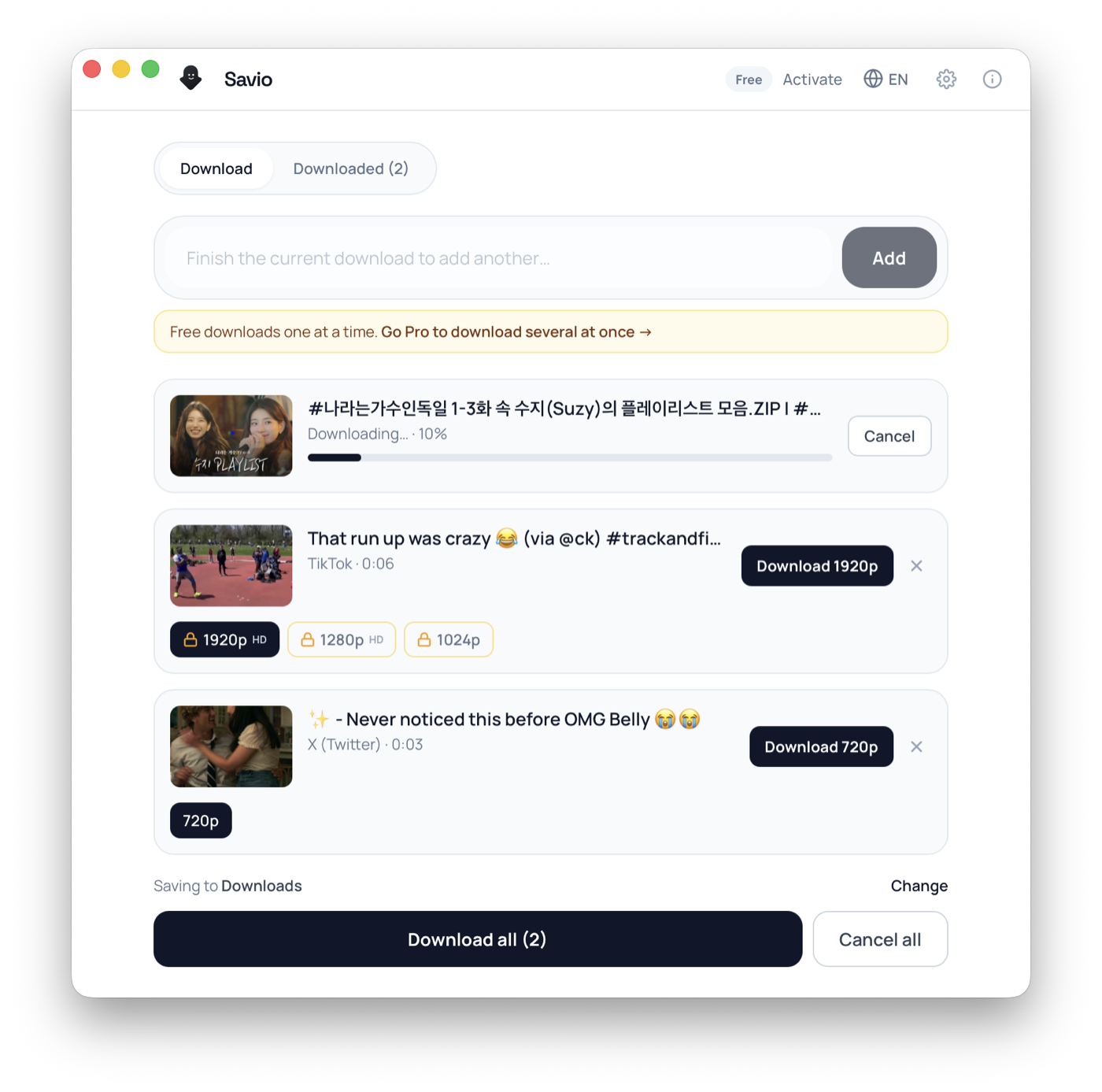
Savio Desktop — batch download queue showing per-video resolution options and live progress

Free desktop app

Download what the browser can't

Free to download. It runs yt-dlp right on your computer — so it works with more sites than the web tool, with no servers in between.

Pro unlocks 4K and larger batches — 3-day trial, cancel anytime.

1

Paste link

2

Get link

3

Download

Instagram Video Downloader

Savio is a web-based Instagram video downloader that turns a public Instagram link into one direct MP4 you can save. Paste a Reel, a feed video post, or a public Story URL, and Savio's yt-dlp engine checks whether Instagram is exposing a downloadable video file. When it is, the server proxies the download, merges the video and audio with FFmpeg so the file has sound, and hands back a single clean MP4. Be clear on the honest scope before you start: Savio only downloads video. It does not save Instagram photos, single image posts, or profile pictures and avatars, and it does not extract audio as a separate MP3. There is no quality picker either; Savio returns the best single MP4 it can build for that post, which for public Reels and feed videos is commonly up to 1080p. Visibility is the hard rule. Public Reels and public feed videos are the most reliable. Public Stories can be saved only while they are still live, since they expire 24 hours after posting. A carousel (multi-item) post can mix photos and clips, and Savio targets the video item inside it, not the photos. Private accounts, followers-only posts, and Close Friends Stories are login-gated and cannot be downloaded. If a link opens in a logged-out browser, Savio has a real chance of returning the file. This page explains exactly what to expect when you download Instagram video with Savio, and what is out of scope.

What you can download

  • Public Instagram Reels as a single MP4 with original audio
  • Public feed video posts and longer in-feed videos
  • Public Stories while they are still live (before the 24-hour expiry)
  • The video item inside a public carousel (multi-item) post
  • The best single MP4 Savio can build for that post, commonly up to 1080p
  • Direct in-browser downloads of public links, with no sign-in required

Frequently asked questions

Can Savio download private Instagram videos?

No. Savio only works with public content that opens without a login. Private accounts, followers-only posts, and Close Friends Stories are login-gated, so they cannot be downloaded. If the link prompts you to sign in, it will not work.

Can I download Instagram photos, image posts, or a profile picture?

No. Savio is a video downloader only. It does not save photos, single image posts, carousel images, profile pictures, or avatars. Only the video in a public Reel, feed post, Story, or carousel can be returned.

Are Instagram Reels supported?

Yes, public Reels are the most reliable type to download. Savio returns the Reel as a single MP4 with its original audio merged in, at the best resolution Instagram exposed for that post.

Do Instagram Stories always work?

Only while they are live. Stories disappear 24 hours after posting, and once that window closes the media is gone. Savio can only save a public Story that has not yet expired and that contains video, not a photo Story.

Can Savio grab a video from a carousel (multi-photo) post?

Yes, if the public carousel contains a video item that Instagram exposes as a file. Savio targets the video clip and returns it as a standalone MP4. The photos in the same carousel are not downloaded.

Can I get just the audio as an MP3?

Not on the web tool. Savio returns the MP4 with its audio embedded and does not split out a separate MP3. Audio-only (MP3) extraction is planned for Savio Desktop, a paid desktop client coming soon, which you can join the waitlist for.

Can I pick the resolution or download in 4K?

No. The web tool returns one MP4 with no quality picker, commonly up to 1080p for public Reels and feed videos, depending on how the creator uploaded it. Higher-resolution exports are planned for the upcoming Savio Desktop client; join the waitlist to be notified.

Will the downloaded video have sound?

Yes. Savio's server merges the video and audio tracks with FFmpeg before giving you the file, so your Instagram MP4 plays with its original audio rather than coming back silent.

Does Savio remove the Instagram username or watermark?

No. Savio adds no watermark of its own, but it cannot remove an overlay the creator burned into the video frame, such as a username, caption sticker, or logo. Those are part of the pixels and stay in the file.

Why did my Instagram link fail the second time?

Instagram media URLs are signed and time-limited, so they can expire between attempts. Copy a fresh public link directly from the post and run it through Savio again, then download the MP4 promptly.

How people use it

Save a Reel before it gets deleted

Creators often pull Reels down or swap them out. Paste the public Reel link into Savio and grab the MP4 while it is still up, so you keep a copy of a tutorial, recipe, or clip you want to rewatch offline. Savio merges the audio in, so the saved Reel is not silent.

Back up your own public video posts

If you run a public account, Instagram has no clean one-click way to re-download a Reel or feed video you already published. Paste the public post link and Savio returns a standard MP4 for your own archive. Note it saves the video only, not any photos in the same post.

Catch a public Story before it expires

Stories vanish 24 hours after posting. When a public account shares a Story that contains video, run the link through Savio while it is still live to save that clip before the window closes and the media goes dead.

Pull the video out of a carousel post

Carousel posts mix photos and video in one URL. If a public carousel contains a video item, Savio targets that clip and returns it as an MP4. The photos in the carousel are not downloaded, since Savio handles video only, not images.

Formats & quality

Savio returns one MP4 per Instagram link (H.264 video with AAC audio), so the saved file plays everywhere with sound. There is no quality menu and no format conversion: the server merges the video and audio tracks with FFmpeg and gives you a single playable file, not a list of resolutions to choose from. Resolution depends entirely on what Instagram published. Public Reels and feed videos are commonly served around 1080p on the long side, while older posts, heavily compressed uploads, and Stories often come back smaller, and Savio cannot upscale past the source. Important limits: Savio does not extract audio as a separate MP3, does not save photos, single image posts, profile pictures, or avatars, and does not pull out captions, on-screen text, comments, or stickers as separate files. Savio adds no watermark of its own, but it also cannot remove anything the creator burned into the frame, such as a username overlay or a sticker. Higher-resolution exports, batch downloads, and audio-only (MP3) extraction are planned for Savio Desktop, a paid desktop client that is coming soon; you can join the waitlist, but those features are not available on the web tool today.

Troubleshooting

The Story link returns nothing or fails

Stories expire 24 hours after posting, so once the window closes the media no longer exists to download. Only a still-live Story from a public account can be saved, and only if it actually contains a video rather than just a photo.

Savio says the content is private or unavailable

The account is private, followers-only, or the post is a Close Friends Story. These are login-gated and Savio cannot access them. Confirm the link opens in a logged-out browser; if Instagram asks you to sign in, it is not public.

You wanted a photo, an image post, or a profile picture

Savio downloads video only. Photos, single image posts, carousel images, profile pictures, and avatars are out of scope on the web tool and will not be returned, even from a public account.

A carousel post gives you nothing, or not the clip you wanted

Savio targets the video item in a carousel and ignores the photos. Make sure the public post actually contains a video, and that the URL points to the post itself. If no video item is exposed as a file, there is nothing to pull.

The link worked earlier but now errors out

Instagram's media URLs are signed and time-limited, so a previously valid link can expire. Copy a fresh public link straight from the post and run it again right away.

The downloaded Reel is lower resolution than expected

Savio returns the best single MP4 Instagram exposes for that post and cannot upscale. Older or heavily compressed uploads were simply published smaller, so no tool can recover detail that was never there. There is no quality picker to force a higher size.

Answer Hub

Quick answers

Can Savio download private Instagram videos?

No. Savio only works with public content that opens without a login. Private accounts, followers-only posts, and Close Friends Stories are login-gated, so they cannot be downloaded. If the link prompts you to sign in, it will not work.

Can I download Instagram photos, image posts, or a profile picture?

No. Savio is a video downloader only. It does not save photos, single image posts, carousel images, profile pictures, or avatars. Only the video in a public Reel, feed post, Story, or carousel can be returned.

Are Instagram Reels supported?

Yes, public Reels are the most reliable type to download. Savio returns the Reel as a single MP4 with its original audio merged in, at the best resolution Instagram exposed for that post.

Download workflow

Download by link on the website

Paste a supported public URL above. Savio shows the download when the platform exposes a usable video file.

Other downloaders