
Facebook Video Downloader

Paste a public Facebook video or Reel link. Savio checks for a downloadable file and shows the result.

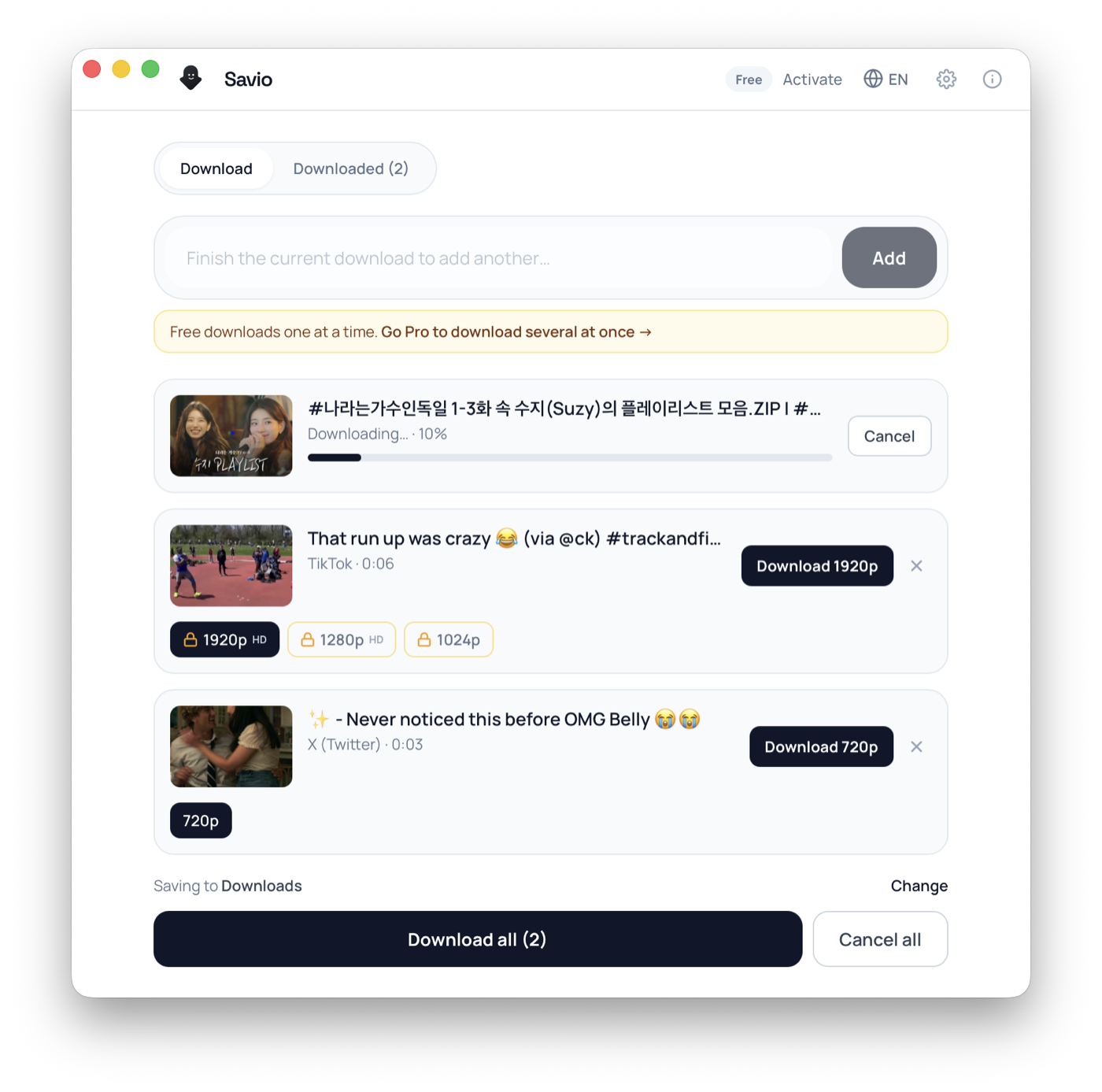
Savio Desktop — batch download queue showing per-video resolution options and live progress

Free desktop app

Download what the browser can't

Free to download. It runs yt-dlp right on your computer — so it works with more sites than the web tool, with no servers in between.

Pro unlocks 4K and larger batches — 3-day trial, cancel anytime.

1

Paste link

2

Get link

3

Download

Facebook Video Downloader

Savio is a web-based Facebook video downloader that runs on yt-dlp, with the heavy lifting done server-side: it fetches a public Facebook link through our own server, merges the video and audio into a single MP4, and hands you one direct download link. There is nothing to install and no account to create. Facebook is worth explaining because the same clip can live in several public surfaces at once: a feed post, a Facebook Watch page, a Reel, or a Page video. Each shows a slightly different URL, but they all resolve to Facebook's CDN (fbcdn.net), and Savio simply requests the best progressive file the host exposes for a logged-out visitor. Because the download is proxied through our server rather than your browser, Savio can usually merge the best public quality Facebook serves, which on most public Reels and Watch videos reaches 1080p. To be honest about it: there is no quality picker and no 4K guarantee. You get the single best MP4 the platform makes available for that post, and very high-resolution masters above 1080p are not something Facebook reliably exposes to an anonymous request. Savio only works with genuinely public links, the kind you can open in a private browser window while logged out. It does not log in, does not crack private posts, and cannot reach anything inside a closed group, a friends-only setting, or a Marketplace chat. If you can watch it without an account, Savio can usually download that facebook video as an MP4. If you cannot, neither can the tool.

What you can download

  • Public Facebook feed videos and Page posts shared openly
  • Public Facebook Watch clips, including Page-hosted long-form videos
  • Public Facebook Reels (the short vertical format)
  • The single best progressive MP4 Facebook serves, commonly up to 1080p
  • Public live replays, once a finished broadcast is saved as a normal video
  • One video at a time from its own link (no playlist or whole-Page bulk grab)

Frequently asked questions

Can Savio download private Facebook videos or group posts?

No. Savio only fetches content that is publicly viewable without logging in. Friends-only posts, closed or secret groups, and anything behind a Facebook login cannot be reached, and there is no bypass for that by design.

How do I tell if a Facebook video is actually public?

Open the post link in a private or incognito browser window while logged out. If the video plays there, it is public and Savio can usually fetch it. If Facebook asks you to log in, it is gated and will not work.

What quality will I get from the Facebook downloader?

Savio returns the single best progressive MP4 Facebook serves for that post, merged server-side. On most public Reels and Watch videos that reaches 1080p; older uploads may only come back at 720p. There is no quality picker and no 4K, because Facebook does not reliably expose masters above 1080p to an anonymous request.

Can I get an MP3 or audio-only file from a Facebook video?

No. The web tool only returns a complete MP4 with audio merged in, not a separate audio file. MP3 and audio-only extraction is planned for Savio Desktop, a paid desktop client coming soon — you can join the waitlist for it.

Are Facebook Reels supported?

Yes, public Reels work. Savio merges the vertical 9:16 MP4 that Facebook exposes for the Reel, commonly at 1080p. Reels set to private or to a limited audience are not retrievable.

Can I download Facebook Watch videos?

Public Facebook Watch clips, including Page-hosted long-form videos, are supported when Facebook serves a downloadable file to a logged-out visitor. Watch content that is restricted or region-locked may fail.

Can Savio download a whole Page or a playlist of Facebook videos at once?

No. The web tool handles one public video per link. Batch and playlist downloading is a planned feature of the upcoming Savio Desktop client, not something the website does today, so join the waitlist if you need bulk saving.

Can I download a Facebook Live stream?

Only after it ends. While a broadcast is live there is no finished file. Once Facebook saves the replay as a normal public video, paste that link and Savio can fetch the saved MP4.

Why does my Facebook download link stop working after a while?

Facebook's fbcdn.net URLs are signed and expire after a short window. Just re-paste the original post link into Savio to generate a fresh download link, and grab the file promptly.

Do I need an account, an extension, or an app to use the Facebook downloader?

No. Savio runs entirely in your web browser — there is nothing to install, no extension, and no account. You paste a public Facebook link and it returns a direct MP4 processed on our server. A paid Savio Desktop client with extra features is coming soon, but the web tool needs none of it.

How people use it

Save a Page's public Watch video for offline reference

Brands, news outlets and creators post long-form clips to Facebook Watch under their Page. When one is public, paste its URL and Savio returns the best MP4 the host serves, often 1080p, so you can keep a copy for offline viewing before the Page edits or removes it. There is no quality menu; you get the single best file Facebook exposes.

Grab a public Reel you want to re-watch

Facebook Reels are the short vertical clips that play in their own feed. If the Reel is public, Savio merges the underlying MP4 server-side so you are not stuck re-scrolling Facebook every time you want to see it again. Reels frequently come back at 1080p, but the exact resolution is whatever Facebook published for that clip.

Keep a public live replay before the Page takes it down

After a public Facebook Live broadcast ends and is saved as a normal video, you can paste that replay link and save it. An in-progress live stream is not a finished file, so wait until the broadcast has fully ended and the saved replay opens in a logged-out browser.

Download your own public posts as a backup

If you posted a video publicly and want a local copy without digging through Facebook's data-export flow, paste the post link and Savio hands back the merged MP4 directly, as long as the post is genuinely set to public.

Formats & quality

Savio returns one file per Facebook link: a single MP4 (H.264 video with AAC audio) with the audio already merged in. There is no separate audio track to manage and, importantly, no MP3 or audio-only export, no quality dropdown, and no format conversion. The web tool gives you the best progressive MP4 Facebook serves for that post through our server-side proxy, which on most public Reels and Watch videos lands at 1080p, and sometimes 720p on older or lower-resolution uploads. We do not promise 4K, because Facebook does not reliably expose masters above 1080p to an anonymous request. Reels come back as vertical (9:16) MP4 clips and regular Watch and feed videos are usually horizontal 16:9; Savio does not add a watermark, so the file is exactly what Facebook's CDN serves, including any branding the uploader baked in. A few things the web downloader does not do: it does not extract thumbnails or cover images, it does not pull GIFs out as separate files, it does not save profile pictures or photo posts, and it does not download playlists or every video on a Page in one action. The fbcdn.net links Facebook generates are signed and time-limited, which is why a working download URL can stop responding an hour later. Higher-resolution exports above 1080p, batch downloads, MP3 extraction, and playlist saving are planned for Savio Desktop, a paid desktop client that is coming soon — you can join the waitlist rather than expecting them in the web tool today.

Troubleshooting

The link works in your browser but Savio says the video is unavailable

You are likely logged in to Facebook, so the post looks public to you but is actually restricted. Open the link in a private or incognito window while logged out. If it does not play there, it is not truly public and Savio cannot reach it.

A video from a Facebook group or friends-only post will not download

Closed groups, secret groups and friends-only posts are login-gated and are not supported. Savio only handles content that is openly viewable without an account. There is no workaround for private content by design.

You wanted an MP3 or audio-only file from a Facebook video

The web tool only returns a complete video MP4 with audio merged in; it does not extract audio on its own. MP3 extraction is a planned feature of the upcoming Savio Desktop client, so join the waitlist if you need audio-only output.

The resolution is lower than you expected

There is no quality picker: Savio returns the single best progressive MP4 Facebook exposes for that post. If it came back at 720p, Facebook likely only published that rung for that video, and the web tool does not produce anything above 1080p.

The download link expires or breaks shortly after you generate it

Facebook's fbcdn.net URLs are signed and time-limited. Re-paste the original Facebook post link into Savio to generate a fresh link, then download promptly instead of saving the file URL for later.

A Watch video or Reel that was working yesterday now fails

The post may have been switched to private, deleted, or moved by the Page owner. Confirm it still opens in a logged-out browser. If the original post is gone or no longer public, the file can no longer be fetched.

Answer Hub

Quick answers

Can Savio download private Facebook videos or group posts?

No. Savio only fetches content that is publicly viewable without logging in. Friends-only posts, closed or secret groups, and anything behind a Facebook login cannot be reached, and there is no bypass for that by design.

How do I tell if a Facebook video is actually public?

Open the post link in a private or incognito browser window while logged out. If the video plays there, it is public and Savio can usually fetch it. If Facebook asks you to log in, it is gated and will not work.

What quality will I get from the Facebook downloader?

Savio returns the single best progressive MP4 Facebook serves for that post, merged server-side. On most public Reels and Watch videos that reaches 1080p; older uploads may only come back at 720p. There is no quality picker and no 4K, because Facebook does not reliably expose masters above 1080p to an anonymous request.

Download workflow

Download by link on the website

Paste a supported public URL above. Savio shows the download when the platform exposes a usable video file.

Other downloaders