
TikTok Video Downloader

Paste a public TikTok link. Savio checks for a downloadable video file and starts the web download when available.

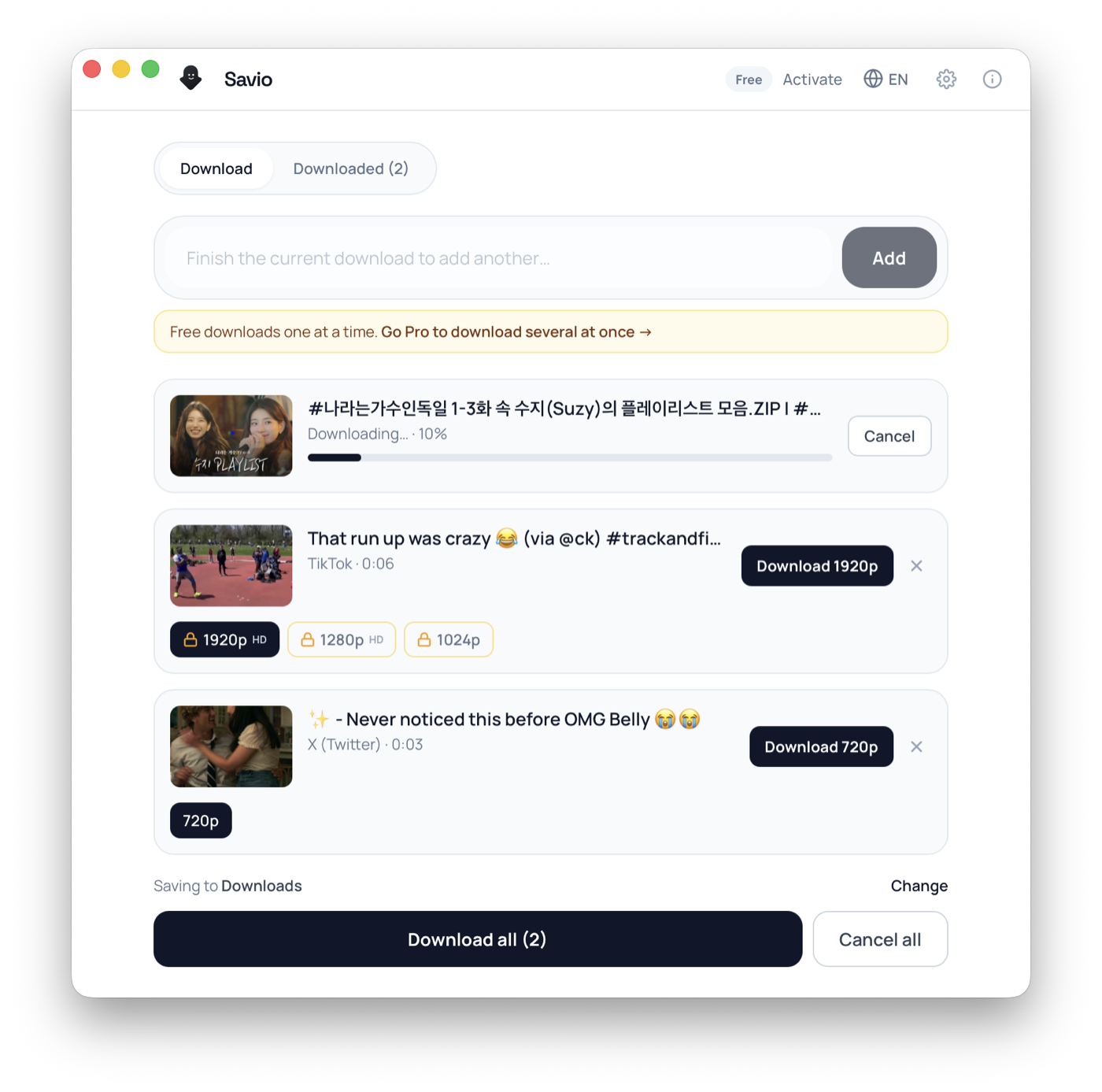
Savio Desktop — batch download queue showing per-video resolution options and live progress

Free desktop app

Download what the browser can't

Free to download. It runs yt-dlp right on your computer — so it works with more sites than the web tool, with no servers in between.

Pro unlocks 4K and larger batches — 3-day trial, cancel anytime.

1

Paste link

2

Get link

3

Download

TikTok Video Downloader

Savio is a web-based TikTok video downloader that turns a public TikTok link into a clean MP4 file right in your browser. Paste a video URL from a public account, and Savio's yt-dlp engine reads the post on the server, then proxies and merges the best available source into a single MP4 with the original sound kept inside it. The difference people notice most is the result: a watermark-free MP4 without the bouncing TikTok logo or the trailing @username card that the in-app "Save video" button bakes into the pixels. Because everything happens server-side, there is no app to install and no sign-in. When TikTok exposes an HD source, Savio uses that higher-quality file (public TikTok videos commonly reach 1080p) instead of the heavily compressed share copy. Be clear on the limits, though. Savio's web tool handles public videos only; it cannot reach private accounts, friends-only posts, or anything behind a login wall. It also does not support TikTok photo slideshow posts, separate MP3 audio extraction, or saving individual images, since the web backend returns a single video MP4 and nothing else. TikTok rotates its media URLs quickly, so the freshest copy of a link works best, and a link can go stale within minutes. If you want to download a TikTok video for an offline archive, a reaction edit, or to repost where the in-app file would stamp a watermark, this page does exactly that: link in, clean MP4 out.

What you can download

  • Public TikTok videos as a single MP4 with no TikTok watermark and no trailing @username card
  • Original sound kept inside the video file (the creator's audio, not a re-recorded version)
  • HD source when TikTok exposes one, commonly up to 1080p, instead of the compressed share copy
  • Trending clips, duets and stitches from public accounts
  • One specific public video per link, fetched and merged server-side
  • Fresh public links that still resolve before TikTok rotates the media URL

Frequently asked questions

Does Savio remove the TikTok watermark?

Savio targets TikTok's source file rather than the in-app share copy, so the returned MP4 has no animated TikTok logo and no rotating @username overlay baked into it. TikTok videos are typically delivered watermark-free this way, which is the main reason people use Savio instead of the app's own Save button.

Is the original sound kept in the download?

Yes. The creator's original audio stays embedded inside the same MP4 as part of the video. Savio does not mute the clip or swap the track, which matters for trending sounds and lip-sync edits. The web tool does not export the sound as a separate file, though.

Can Savio download TikTok photo slideshow posts?

No. TikTok photo slideshow (image carousel) posts are not supported on the web tool. Savio's backend returns one video MP4 per link, and slideshows are stitched images rather than a single continuous video, so they fall outside what the web downloader can save.

Will the download be in HD?

Usually. Savio proxies and merges the best source TikTok exposes for a post, so public TikTok videos commonly come back in HD up to 1080p instead of the compressed share copy. There is no manual quality selector — you get the best single file the server can read for that video.

Can I get just the audio as an MP3?

Not on the web tool. Savio returns the MP4 video with its audio embedded and does not split out a separate MP3. Standalone MP3 extraction is planned for Savio Desktop, a paid desktop client coming soon — you can join the waitlist to be notified when it launches.

Why do TikTok links stop working so fast?

TikTok rotates its CDN media URLs frequently, so a link can go stale within minutes. Copy a fresh Share link straight from the post and paste it into Savio right away for the best chance of a successful download.

Can Savio download videos from a private TikTok account?

No. Savio only works with public posts that expose downloadable media. Private accounts, friends-only videos, and login-gated content cannot be reached, and there is no workaround.

What about region-locked or age-restricted TikToks?

If TikTok restricts a post to certain countries or gates it by age, Savio may not be able to read it. Those limits come from TikTok, not from Savio, so a different public video that is available in your region is usually the fix.

Do I need the TikTok app or a login to use Savio?

No. Savio runs in the browser and never asks you to log into TikTok or install anything. You only need a public video link, which keeps your TikTok account credentials out of the process entirely.

Can I batch-download lots of TikToks or grab 4K at once?

Not with the web tool, which handles one public video link at a time and returns a single MP4. Batch downloading and higher tiers are planned for Savio Desktop, a paid desktop client coming soon; join the waitlist if you want early access.

How people use it

Repost without the watermark

Saving a video from the TikTok app stamps it with the moving logo and the original creator's handle. Savio returns a clean MP4 so editors and social managers can re-cut or re-frame footage without burning in a competitor's watermark. The original audio stays embedded as part of the video, so a trending sound survives the export.

Archive a clip before it disappears

Creators delete videos, switch to private, or get region-blocked without warning. Pulling a public link through Savio gives you a local MP4 copy with the original audio, so a favorite clip is not lost if the post comes down later. Grab it while the link is still live, since TikTok's media URLs expire fast.

Keep the original sound for an edit

When you want a trending sound or a voiceover exactly as posted, Savio keeps the original audio inside the MP4 rather than muting the clip or swapping in a generic track. That matters for lip-sync edits and compilations. Note the web tool does not split out a standalone MP3 — the sound stays part of the video file.

Save HD footage for a reaction or commentary cut

TikTok's in-app share sheet often hands you a recompressed, watermarked copy. Savio targets the source TikTok exposes and merges the best available quality, frequently 1080p, so you get a cleaner MP4 to caption, trim, or react to instead of screen-recording at degraded quality.

Formats & quality

TikTok delivers video as H.264 MP4 with AAC audio, and that is exactly what Savio hands back, so the file plays on phones, desktops and editors without any conversion. The web tool returns one merged video MP4 per link — there is no quality picker, no format conversion, and no separate audio-only export. Resolution depends on what TikTok exposes for that post: most public videos are vertical 1080x1920 or 720x1280, and Savio proxies the download server-side and merges the highest-quality source it can read, so public TikTok clips commonly come back in HD up to 1080p rather than the heavily compressed in-app share copy. The defining TikTok point is the watermark: because Savio targets the source file, the result has no animated TikTok logo and no rotating @username overlay baked into the pixels, and TikTok videos are typically delivered without a watermark this way. The original sound stays embedded inside the same MP4 as part of the video; Savio does not pull it out as a standalone MP3 on the web. Savio does not support TikTok photo slideshow posts, single-image saves, or profile pictures, and it does not add any Savio watermark of its own. Higher-tier features like 4K, batch downloads, MP3 extraction and playlist saving are not part of the web tool — those are planned for Savio Desktop, a paid desktop client coming soon, and you can join the waitlist to be notified.

Troubleshooting

The download fails a few minutes after you copied the link

TikTok rotates its CDN media URLs quickly, so a link that resolved earlier can go stale. Open the post again in the TikTok app or on the web, tap Share, copy a fresh link, and paste that new copy into Savio right away.

The video belongs to a private or friends-only account

Savio only reads public posts. Private accounts, friends-only videos, and anything behind a login wall cannot be reached. There is no workaround; the account owner would need to make the post public.

You pasted a photo slideshow link and nothing usable came back

TikTok photo / slideshow (image carousel) posts are not supported by the web tool, because the backend returns a single video MP4 and slideshows are stitched images, not one continuous video stream. Use a standard video link instead.

The post is region-locked or age-gated and will not resolve

Some TikTok content is restricted to certain countries or gated by age. If TikTok blocks the post from being read, Savio cannot fetch it. Try a different public video that is available in your region.

You pasted a profile or hashtag link instead of a single video

Savio needs the link to one specific public video, not a creator profile, a hashtag feed, or a search page. Open the exact video first, use Share to copy its direct URL, then paste that single link.

Answer Hub

Quick answers

Does Savio remove the TikTok watermark?

Savio targets TikTok's source file rather than the in-app share copy, so the returned MP4 has no animated TikTok logo and no rotating @username overlay baked into it. TikTok videos are typically delivered watermark-free this way, which is the main reason people use Savio instead of the app's own Save button.

Is the original sound kept in the download?

Yes. The creator's original audio stays embedded inside the same MP4 as part of the video. Savio does not mute the clip or swap the track, which matters for trending sounds and lip-sync edits. The web tool does not export the sound as a separate file, though.

Can Savio download TikTok photo slideshow posts?

No. TikTok photo slideshow (image carousel) posts are not supported on the web tool. Savio's backend returns one video MP4 per link, and slideshows are stitched images rather than a single continuous video, so they fall outside what the web downloader can save.

Download workflow

Download by link on the website

Paste a supported public URL above. Savio shows the download when the platform exposes a usable video file.

Other downloaders